|
|
CUDA Image Processing Library for NVIDIA GPUs
Fastvideo has designed high performance Library for fast image processing on NVIDIA GPU with CUDA technology. That Library is a set of separate components which correspond to standard image processing pipeline for camera and other applications. We cover all image processing stages starting from camera raw image acquisition to JPEG or JPEG2000 compression with storage to RAM or HDD. All image processing is done completely on GPU and this leads to exceptionally high performance. We can also offer high speed imaging libraries for non-camera applications.
Summary of CUDA Image Processing Library
- Very High Performance
- Low latency
- Better image quality
- Ease of maintenance, updates and upgrades
- Compatibility with third-party libraries on CPU and GPU
- Integration with FFmpeg and UltraGrid
- Library availability for full range of NVIDIA GPUs
- Reduced TCO for final applications
CUDA Image Processing Library Features
- Image ingestion from a camera, frame grabber, HDD/SSD/RAM or GPU memory (PGM, BMP, PPM, JPG, YCbCr, RAW, DNG, byte array, OpenGL texture or PBO, etc.)
- Dark frame subtraction (FPN)
- Flat-Field Correction (Shading Correction)
- Bad Pixels Removal
- White Balance and Exposure Correction
- Exposure correction
- Raw denoising
- High quality demosaicing: L7, DFPD, MG algorithms
- Noise removal with wavelets, NLM, bilateral filters
- Color Correction with matrix profile
- Color Transforms: RGB->YCbCr, YCbCr->RGB, RGB->HSV, HSV->RGB, etc.
- Composite or per-color component 8/10/12/14/16-bit LUTs for tone mapping in RGB or HSV (Hue->Hue, Hue->Saturation, etc.)
- 3D LUT for RGB and HSV
- Histograms for raw and processed data
- RGB Parade (waveform monitor)
- Crop
- Rotation (90/180/270 degrees) and flip/flop
- Resize (downscale and upscale)
- Remap
- Gamma transform (composite or per-color component)
- Sharpening with Unsharp Mask filter (USM)
- Realtime output via OpenGL
- JPEG compression and decompression (8/12 bits)
- Raw Bayer lossy compression and decompression
- JPEG2000 codec (8-16 bits per channel)

CUDA Image and Video Processing Library Options
- Unpacking module for various raw formats
- Image tiling
- Pyramid images
- Auto white balance
- Discrete Cosine Transform
- Discrete Wavelet Transforms: CDF 5/3 and 9/7, Haar, UHaar, UCDF
- Time measurements for all SDK modules
- Trace module
- Multiplexor module
- Support for input data from HD-SDI grabbers: Bluefish, Deltacast, Imperx
- Multiple camera solution
- Stream-per-thread option
- RAW and DNG image and video processing
- NVIDIA Jetson Nano, TX2, NX and AGX Xavier, Orin support
- FFmpeg filters on GPU for high performance processing
We are developing and optimizing software for the latest NVIDIA GPUs as well as we are designing new image processing algorithms to get high image quality and excellent performance.
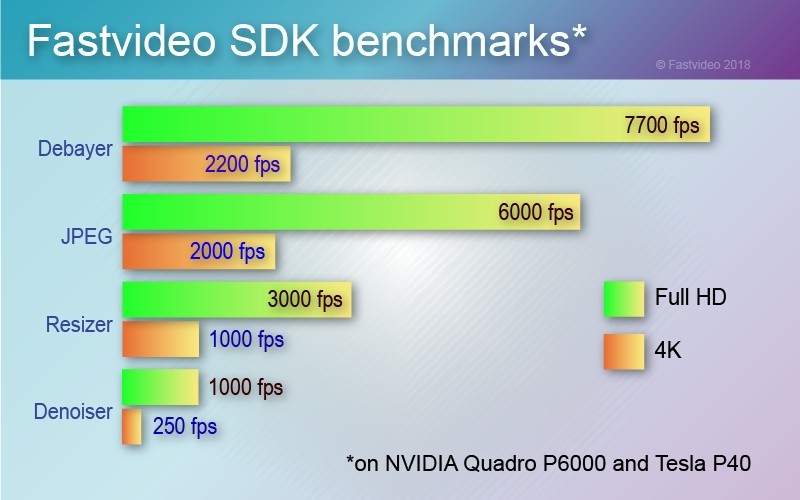
*OS Windows-10 (64-bit), CUDA-10 (64-bit). Timing includes GPU computations only, single frame image processing at one GPU (no batch mode, no streaming). JPEG encoding with compression ratio ~10:1 (24-bit data, jpeg quality 90%) and subsampling 4:2:0. Debayer algorithm is DFPD. Resize algorithm is Lanczos (2x downscaling). Denoising with CDF97 wavelet. Here you can find other benchmarks for our SDK.
Compatibility
- OS Windows-10 (64-bit), Linux Ubuntu (64-bit), Linux4Tegra (L4T)
- CUDA-12.3, MSVS 2022, sample C++ applications with source code
- NVIDIA GPUs (Pascal, Volta, Turing, Ampere, Ada) for mobile, laptop, desktop, server
- MJPEG integration with FFmpeg (reader/writer), FFmpeg is under LGPLv2.1
Sample applications with source codes
- CUDA JPEG Codec
- Raw Bayer Codec
- Debayer
- Debayer + JPEG
- Denoiser
- Resizer
- SDI converter
- JPEG Resize (jpeg decoding, crop, resize, sharp, jpeg encoding)
- Camera application on C++ and CUDA: raw data acquisition and unpacking, dark frame subtraction, shading correction, white balance, debayer, luma and chroma denoising, color correction, tone mapping, LUT, rotate, crop, resize, remap, sharp, OpenGL/GLFW output, JPEG, JPEG2000 and H.264 compression, writer to AVI (MJPEG)
- AVI player (MJPEG) via GLFW
- MXF player
- CUDA Streams sample application
- FFmpeg Remap filter
Freeware CUDA-based applications from download page
Custom CUDA Accelerated Image Processing Library
We can offer integration services to connect your software with our image and video processing library. To achieve high performance on GPU for specific imaging applications, Fastvideo is also developing CUDA custom image and video processing solutions according to agreed specification. If you can't find above your image processing pipeline, call us to discuss that possibility. You can also have a look at our projects in development.
Licensing for CUDA Image Processing Library
We license CUDA Image Processing Library and its components to software developers, camera manufacturers and resellers, internet providers, software integrators, etc. That library is utilized in wide range of imaging applications. Demo version of the library, documentation, licensing info and quotation are available upon request. We are also offering custom software design according to agreed specification. If you need to get significant speedup or to improve quality of your image processing application, don't hesitate to contact us.
Roadmap for CUDA Image Processing Library from Fastvideo
|