
Dynamic bad pixel correction in bayer images on GPUModern image sensors usually have much more than megapixel resolution and we could expect that all these pixels are fully functional. Unfortunately, this is not the case and among millions of pixels there are some defective. It's super complicated task to manufacture megapixel image sensors without such pixels. These pixels are usually called "bad pixels" and they could be classified according to the following:
If we have a look at image sensor detailed specification from any manufacturer, we will see a confidential document which is describing bad pixels and their positions. Yes, each image sensor manufacturer knows that there are some bad pixels and that number will eventually grow during sensor usage. To consider any particular image sensor to be good, we could compare actual positions and a number of bad pixels with the specification. Usually bad pixels are allowed to be not in the vicinity of image sensor center, but closer to the borders. Camera manufacturers usually sort image sensors before manufacturing cameras, because different camera applications have not the same requirements for image quality. If we compare a surveillance camera with a camera for microscope, they just can't have the same number of bad pixels. Image sensor manufacturers grade their devices according to a number and type of defects present. Bad pixels are really bad if we don't remove them before image segmentation, image recognition, stitching, 3D modelling, etc. These bad pixels don't do anything good for image viewing either. So we see too many reasons to suppress them. As soon as bad pixels are quite common, there are several ways of how we could remove them:
Bad pixels suppression in the FPGA is very convenient way and it's super fast, but we need to keep the list of bad pixels up-to-date. To check the appearance of new bad pixels, we need to run calibration tests to update that list. Unfortunately this is not always convenient to do that, so that approach is not 100% applicable. The most flexible approach is to remove bad pixels in RAW data via software. Here we can either interpolate bad pixels according to the known list of coordinates or we could implement special dynamic filter which is able to recognize bad pixels and to interpolate them at RAW data. If we haven't removed bad pixels from RAW, we still can remove them from RGB. In such a case, the removal is still possible, though it will be done after demosaicing, that's why some "traces" of bad pixels could be found at the neighbour pixels. That method is viable as well, but it's not the best. Bad pixel correction filterWe've implemented high performance filter for bad pixel correction (BPC). Basically, we need to remove impulse noise and such a removal is almost always good for the picture. The main idea is to apply that filter not to all pixels, but only for those, which look like bad/hot/dead pixels. We analyze the vicinity of each RAW pixel and formulate some criteria to recognize the pixel to be bad. This is done in RAW domain, so we apply different criteria for Green and Red/Blue pixels. The algorithm can work in wide range of illumination intensities and we've done some tests to investigate these situations. We see almost the same situation when we calibrate a camera to get Flat-Field Correction (FFC) frame. Hot pixels could influence on the results of FFC, so we need to interpolate them before we do any computations.
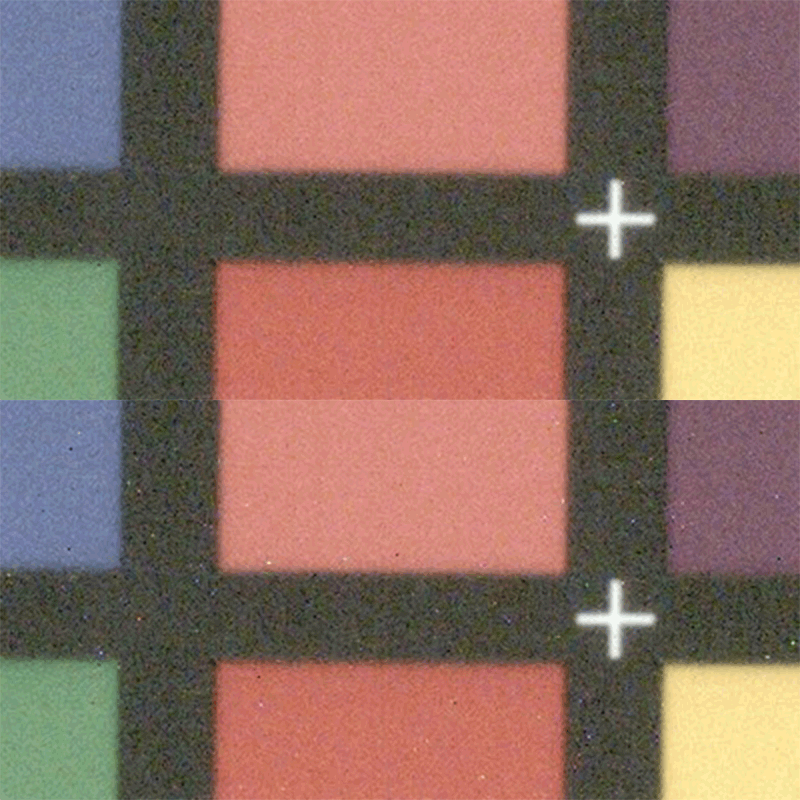
Apart from bad pixel repair we always need to keep an eye on a total number of processed pixels with that filter. This is indirect way to check image sensor degradation and quality. That solution is handy and could be applied to RAW data from any camera. Soon we will extend that filter to be able to work with RGB data as well, because such a demand to fix bad RBG pixel does exist. Bad pixel replacement on NVIDIA GPUWe've implemented BPC filter on GPU to offer good performance and quality even for cameras with high resolution image sensors in realtime applications. We process bad pixels in RAW domain and we can do that really fast. One frame from 12 MPix 12-bit image sensor could be fixed at less than ~1 ms on NVIDIA GeForce GTX 1080 even without having all coordinates of bad pixels - we detect and interpolate bad pixels in realtime. This is actually dynamic bad pixel correction algorithm. That feature is now the constituent part of the Fastvideo SDK and it's available for mobile, laptop, desktop and server GPUs from NVIDIA.
To check performance and quality for BPC algorithms, you can download Fast CinemaDNG Processor software for evaluation. |