
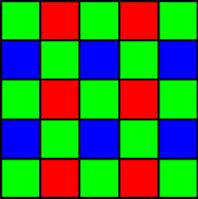
Demosaic JPEG SoftwareDemosaicing is a transformation of Bayer image into the conventional 24/48-bit RGB format. Demosaicing is required because digital cameras usually don’t produce ready-to-go RGB images, instead they store visual information as a set of separate R, B and G pixels derived from the image sensor of the camera, and the actual color of a pixel in that set is determined by interpolating nearby pixel colors. To high quality demosaicing algorithm we have added JPEG compression to fulfill the following:
|
| Bilinear demosaic | HQLI demosaic | AHD demosaic | DFPD demosaic | |
| Demosaic only, PSNR (dB) / SSIM | 30.37 / 0.87 | 35.97 / 0.97 | 37.38 / 0.97 | 38.86 / 0.98 |
| Demosaic + JPEG, quality 100%, PSNR (dB) / SSIM | 29.36 / 0.87 | 34.52 / 0.96 | 36.88 / 0.96 | 38.24 / 0.97 |
| Demosaic + JPEG, quality 95%, PSNR (dB) / SSIM | 29.16 / 0.86 | 34.18 / 0.95 | 36.21 / 0.95 | 37.28 / 0.96 |
| Demosaic + JPEG, quality 90%, PSNR (dB) / SSIM | 29.13 / 0.86 | 33.83 / 0.94 | 35.53 / 0.94 | 36.30 / 0.95 |
| Demosaic + JPEG, quality 85%, PSNR (dB) / SSIM | 29.15 / 0.86 | 33.46 / 0.93 | 34.88 / 0.93 | 35.46 / 0.94 |
| Demosaic + JPEG, quality 80%, PSNR (dB) / SSIM | 29.19 / 0.86 | 33.05 / 0.92 | 34.30 / 0.92 | 34.74 / 0.93 |
| Demosaic + JPEG, quality 75%, PSNR (dB) / SSIM | 29.21 / 0.85 | 32.66 / 0.91 | 33.78 / 0.91 | 34.13 / 0.92 |
| Bilinear demosaic | HQLI demosaic | AHD demosaic | DFPD demosaic | |
| Demosaic only, PSNR (dB) / SSIM | 30.37 / 0.87 | 35.97 / 0.97 | 37.38 / 0.97 | 38.86 / 0.98 |
| Demosaic + JPEG, quality 100%, PSNR (dB) / SSIM | 29.86 / 0.88 | 34.75 / 0.96 | 36.77 / 0.96 | 37.96 / 0.97 |
| Demosaic + JPEG, quality 95%, PSNR (dB) / SSIM | 29.66 / 0.87 | 34.30 / 0.95 | 36.07 / 0.95 | 37.01 / 0.96 |
| Demosaic + JPEG, quality 90%, PSNR (dB) / SSIM | 29.66 / 0.87 | 33.86 / 0.94 | 35.38 / 0.94 | 36.05 / 0.95 |
| Demosaic + JPEG, quality 85%, PSNR (dB) / SSIM | 29.70 / 0.87 | 33.44 / 0.93 | 34.72 / 0.93 | 35.21 / 0.94 |
| Demosaic + JPEG, quality 80%, PSNR (dB) / SSIM | 29.72 / 0.87 | 33.00 / 0.92 | 34.12 / 0.92 | 34.49 / 0.93 |
| Demosaic + JPEG, quality 75%, PSNR (dB) / SSIM | 29.71 / 0.86 | 32.59 / 0.91 | 33.58 / 0.91 | 33.88 / 0.92 |
| Bilinear demosaic | HQLI demosaic | AHD demosaic | DFPD demosaic | |
| Demosaic only, PSNR (dB) / SSIM | 30.37 / 0.87 | 35.97 / 0.97 | 37.38 / 0.97 | 38.86 / 0.98 |
| Demosaic + JPEG, quality 100%, PSNR (dB) / SSIM | 30.46 / 0.90 | 34.87 / 0.97 | 36.59 / 0.96 | 37.66 / 0.97 |
| Demosaic + JPEG, quality 95%, PSNR (dB) / SSIM | 30.21 / 0.89 | 34.31 / 0.95 | 35.85 / 0.95 | 36.69 / 0.96 |
| Demosaic + JPEG, quality 90%, PSNR (dB) / SSIM | 30.21 / 0.88 | 33.85 / 0.94 | 35.13 / 0.94 | 35.72 / 0.95 |
| Demosaic + JPEG, quality 85%, PSNR (dB) / SSIM | 30.19 / 0.88 | 33.38 / 0.93 | 34.43 / 0.93 | 34.88 / 0.94 |
| Demosaic + JPEG, quality 80%, PSNR (dB) / SSIM | 30.14 / 0.87 | 32.91 / 0.92 | 33.83 / 0.92 | 34.17 / 0.93 |
| Demosaic + JPEG, quality 75%, PSNR (dB) / SSIM | 30.09 / 0.87 | 32.48 / 0.91 | 33.29 / 0.91 | 33.57 / 0.92 |
Now it's obvious to evaluate image degradation for combined JPEG+demosaic solution and make a right choice for both demosaic algorithm and JPEG quality. This is just an idea how to choose image processing algorithms and their parameters. Full solution should take into account compression ratio, total performance benchmarks, hardware pricing, and much more.
Bilinear demosaicing algorithm has good speed, though quality is moderate according to PSNR and SSIM metrics. Quality loss after bilinear algorithm is significant and JPEG compression doesn't really change PSNR/SSIM after demosaicing. That's why we would suggest to choose demosaicing from HQLI/AHD/DFPD or other high quality algorithms.
We are also developing fast image processing software on GPU for high speed and high resolution cameras in realtime: dark frame subtraction, flat field correction, white balance, image filtering, noise removal, color correction, demosaicing, jpeg/j2k compression, etc.
 What's unique in Demosaic JPEG Software
 GPU JPEG Demosaicing Software Features